iPad Casinos in the UK: Payments, Apps and Checks
 Available in GB

A practical guide to checking payment limits, fees, app support and offer terms before choosing an iPad casino.
Table of Contents
- Using an Online Casino on an iPad: Check the Cashier First
- Comparing iPad Casino Options Without Trusting the Sales Pitch
- Casino Games and Slots on iPad: What This Guide Can—and Can’t—Verify
- Playing for Real Money: Deposits, Withdrawals and the Credit-Card Rule
- Casino Apps on iPad: Check What the App Actually Supports
- Free iPad Slots and Downloads: Don’t Assume There’s a Verified Pick
- Before Your First iPad Casino Deposit, Set a Financial Limit
- Bonuses, No-Deposit Offers and Bitcoin: Check the Terms, Not the Label
- Live Casino on iPad: Payment Details Still Matter
- Pay-by-Mobile on iPad: Payforit’s £30 Cap and Withdrawal Catch
- Payments
Using an Online Casino on an iPad: Check the Cashier First
An iPad can make a casino site feel straightforward: sign in, open the cashier, and look at the payment options on the screen. The part I used to rush was that last step. A tidy page and a familiar logo do not tell you what your account will actually be charged, or what limits apply. I now treat the cashier as the place to check before making a deposit, not a button to tap after I have already decided to pay.
The key is to inspect the live cashier while signed in. A specialist review also advises checking the cashier directly, because its terms and options can change. Look for the minimum deposit, the maximum transaction value and any fee shown for the payment method you are considering. Those details are more useful than a general statement elsewhere on the site. If a figure is not displayed clearly, pause and find the relevant payment terms or ask the operator before proceeding. Guessing is not a check.
When choosing an iPad casino in the UK for 2026, you’ll want to consider how it fits your needs on a tablet and what to expect when cashing out. Use these verdicts as a concise reference when narrowing down your options.
1. Amunbet
Payout speed: 1-3 business days Amunbet lists a payout speed of 1–3 business days. Keep that timeframe in mind when planning a withdrawal.
2. Revery Play
Payout speed: 1-3 business days Revery Play lists a payout speed of 1–3 business days. That gives you a stated timeframe to consider for withdrawals.
3. EvoSpin
Payout speed: 1-3 business days EvoSpin lists a payout speed of 1–3 business days. You can use this stated timeframe as one factor in your choice.
4. Britsino
Payout speed: 1-3 business days Britsino lists a payout speed of 1–3 business days. Bear that timeframe in mind when considering how soon you may receive a withdrawal.
5. SpinFormula
Payout speed: 1-3 business days SpinFormula lists a payout speed of 1–3 business days. This provides you with a stated withdrawal timeframe to take into account.
6. WinBeast
Payout speed: 1-3 business days WinBeast lists a payout speed of 1–3 business days. You can factor that timeframe into your withdrawal expectations.
7. SlotoSport
Payout speed: 1-3 business days SlotoSport lists a payout speed of 1–3 business days. Keep this stated timeframe in mind when weighing your options.
8. NightLuck
Payout speed: 1-3 business days NightLuck lists a payout speed of 1–3 business days. You have a stated timeframe to consider when planning withdrawals.
9. x3bet
Payout speed: 1-3 business days x3bet lists a payout speed of 1–3 business days. This gives you a clear stated timeframe to bear in mind for payouts.
10. Zombillion
Payout speed: 1-3 business days Zombillion lists a payout speed of 1–3 business days. Take this timeframe into account when considering withdrawals.
Read the amount on the screen
On an iPad, the cashier may fit neatly on the page, or it may place important details further down than you expect. Scroll through the full payment panel and any linked terms rather than relying on the first visible line. Check the amount you intend to enter against the minimum and maximum shown there. If the cashier offers several methods, inspect the terms for the one you plan to use; do not assume the same limits or fees apply to every option.
I once treated a payment screen like a form: enter an amount, press the button, move on. That is how small details become surprises. A minimum can make a planned deposit unavailable, while a maximum can mean the amount you typed cannot be submitted as one transaction. A fee can also change what leaves your payment account compared with the amount credited to the casino balance. Read the displayed information before confirming anything.
If the site opens a separate payment window, take a moment to check that you are still on the operator’s genuine cashier flow and that the amount and method match what you selected. A cramped view is no reason to skip the details. Rotate the iPad, enlarge the page, or return to the cashier if you cannot read the terms. Better a slower check than a confident tap on something you have not understood.
Check account controls, too
The cashier is not only about the payment itself. Before depositing, check whether the account’s financial-limit controls are visible and understand where they can be managed. Do not assume that a limit you remember from a previous visit is still the one shown in your account. The relevant control should be clear enough for you to inspect before money is added.
Casinos That Accept Citadel in the UK: Payment Checks
I find it helpful to separate two decisions: what the payment screen permits, and what I am personally willing to spend. A cashier’s minimum is not a recommendation. A maximum transaction value is not a target. If the amount you planned to deposit does not fit your own budget, close the panel rather than adjusting the plan to suit the screen. That is the sort of tiny decision that is easy to rationalise in the moment.
Keep the operator’s terms open if the cashier links to them, and check that the information refers to the payment method and account you are using. A general page can explain how deposits work, but the signed-in cashier is where you can see the current options and values for your transaction. If its wording is unclear, do not treat an assumption as confirmation.
Make the check before the tap
A practical iPad routine need not be complicated: open the cashier, identify the method, read the minimum and maximum, look for fees, and locate the account’s financial-limit controls. Then check the amount again on the confirmation screen before submitting. If anything has changed from what you expected, stop and review it instead of pressing through.
This matters whether you call it an online casino on an iPad or simply use a casino site in the browser. The screen size does not change the terms attached to the account, and a smooth mobile layout cannot make an unclear charge clearer. The useful question is not whether the cashier looks “easy”. It is whether you can see what the transaction will involve before you approve it.
Do
- Inspect the live cashier while signed in
- Scroll through the full payment panel
- Check the amount against limits
- Locate account financial-limit controls
Don’t
- Rely on remembered figures
- Assume all payment methods have the same fees
- Guess figures not displayed clearly
- Treat a cashier’s minimum as a recommendation
I would not deposit based on a remembered figure, an old screenshot or a promise on a promotional page. Cashier details can be updated, and the method you select may display its own conditions. Check the live information each time you are about to pay. If the minimum, transaction ceiling, fee or account controls are not clear, wait until they are. No rush.
Comparing iPad Casino Options Without Trusting the Sales Pitch
“Best” is a slippery word when you’re comparing casinos on an iPad. A glossy page can make a long payment list look like proof that one option is better than another. I don’t read it that way. A list tells you which methods a reviewer reports; it doesn’t tell you whether every method will appear for your account, or whether the list still matches the operator’s live service.
Current independent specialist reviews report Visa, Mastercard, Skrill, Neteller and PaysafeCard among the payment methods offered by casinos, alongside several major cryptocurrencies. Treat that as a comparison starting point, not a promise about a particular site. The practical question is whether the method you want is actually shown by the casino you are considering.
Casinos That Accept Giropay in the UK: What to Check
Compare like with like
It is tempting to count payment logos and call the longest list the winner. That gives you a neat answer, but not a useful one. One operator’s page may group methods differently from another’s; a review may cover a different set of casinos or have been updated at a different time. Even when two reviews name the same method, that alone doesn’t establish that it is available in the same way on both services.
I’d make a short comparison around the methods you already use or are prepared to use. If you rely on a card, note whether Visa or Mastercard is named. If you prefer an e-wallet, check whether Skrill or Neteller is listed. If PaysafeCard matters to you, look for it specifically rather than assuming every prepaid option means the same thing. For cryptocurrency, a broad phrase such as “major cryptocurrencies” is not a usable answer by itself; find out what the live service actually displays before deciding.
That sounds less exciting than a winner’s badge. It is also less likely to send you chasing a method that isn’t there.
Read the category, not the sales pitch
Payment labels can make different things look interchangeable. They are not. Visa and Mastercard are card names; Skrill and Neteller are e-wallet names; PaysafeCard is a separate named payment option. Cryptocurrencies are another category, and a general mention of them does not identify which assets an operator supports.
Cards
Visa and Mastercard
E-wallets
Skrill and Neteller
Prepaid
PaysafeCard
Digital Assets
Major cryptocurrencies
So I’d compare each option by its exact name, not by the broad wording around it. If a page says “multiple payment choices,” that is a description, not a useful comparison. If it names a method, you can at least check whether the same name appears in another review and then confirm it with the operator.
The iPad itself does not make a payment method available. A method reported by a review still has to be supported by the casino and shown in its current payment options. Keep the device and the payment claim separate: browsing on an iPad is one thing; the operator’s actual list is another.
A simple comparison note
When I compare options, I keep the record plain:
- Named method: Is Visa, Mastercard, Skrill, Neteller or PaysafeCard stated explicitly?
- Vague wording: Does the page say only that cards, e-wallets or cryptocurrencies are accepted?
- Current display: Does the operator show the method when you check its own service?
- Fit: Is it a method you are willing and able to use?
That is not a ranking. It is a way to avoid mistaking a sales phrase for a confirmed option. If one review has a longer list than another, it may give you more names to investigate, but it doesn’t settle which casino suits you. The comparison only becomes meaningful when you check the exact options you care about against the current service.
Keep the decision modest
I used to treat more logos as a shortcut: more choice must mean a better place to play. It isn’t that simple. A list can be broad and still leave you unsure about the one method you want. A shorter list can be enough if it includes what you actually use. Neither tells you, by itself, how well the rest of the service will work for you.
For iPad casino options, start with named payment methods in current independent specialist reviews, then verify the relevant option with the operator. Don’t let “best” do the thinking for you. A badge is a sales claim; a method you can confirm is a comparison point.
Casino Games and Slots on iPad: What This Guide Can—and Can’t—Verify
An iPad can make a casino lobby feel like a catalogue laid out on a bigger screen, but a long row of tiles is not the same as a reliable recommendation. I would not pick a game because its thumbnail looks polished or because a page calls it “best”. That word tells you what the page wants you to think; it does not tell you whether a particular title is available in your account or works as expected on your device.
If you have a particular casino game in mind, check the operator’s own lobby while using your iPad. Look for the title there, then open it and see whether the controls and display suit you. A general list of iPad casino games can go stale, and a title appearing on one site does not establish that another site offers it. No magic shortlist.
Casinos That Accept Upaycard in the UK: How to Check
Slots need the same scepticism. “Best” depends on what you enjoy, and a ranking without clear, current information about the games is not much use. I would rather see what is actually in the lobby than trust a neat-looking list copied from somewhere else.
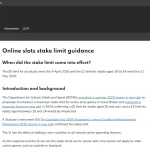
There are also rules that shape slot play in Britain. Autoplay is banned, and each online slot spin must last at least 2.5 seconds. The maximum stake per game cycle is £5 for players aged 25 and over, and £2 for players aged 18 to 24. Those limits are worth knowing before you mistake a quick-looking interface for permission to play at any stake.
That still does not tell you which games a casino carries, or whether a title suits you. Treat the lobby as the place to confirm availability, and the game’s own information as the place to understand what you are opening. I’ve learned not to confuse a confident label with useful detail. Check the actual screen.
Playing for Real Money: Deposits, Withdrawals and the Credit-Card Rule
On an iPad, the payment screen can make real-money play look like one simple loop: put funds in, play, take funds out. I’ve learned not to assume the way in works the way out. A deposit option does not automatically give you a matching withdrawal route, so check both before you decide how to fund an account.
There is a firm rule on credit cards. Remote gambling operators licensed by the UK Gambling Commission cannot accept credit-card payments for gambling. That prohibition also covers payments routed through a money service business; moving the payment through an intermediary does not make credit-card funding acceptable. A credit card is not an alternative to a debit card for an iPad casino deposit.
That distinction matters when payment labels look similar. A debit card draws on available funds in your account, while a credit card borrows against a credit facility. Don’t rely on a broad label such as “card” to tell you which one is being accepted. Read the cashier’s wording and use an eligible payment method. If you cannot tell what the route is, pause rather than trying to force a transaction through another service.
Casinos That Accept Wirecard in the UK: What to Check
Depositing is only half the route
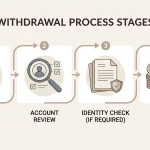
Before making a deposit, I now check what happens if I later want to withdraw. A specialist review advises confirming whether the selected deposit method can also be used for payouts. Treat that as a prompt to check the operator’s current account options, not as a promise that every method will work in both directions.
This is an easy detail to miss on a tablet. The deposit button is right in front of you; withdrawal information may be in a separate cashier tab or account area. Find that route first. If the method you use to fund the account is not listed for withdrawals, you need to know what alternative is available and whether it suits your account.
Specialist reviews describe possible withdrawal routes at UK-licensed casinos as including debit cards, bank transfers, PayPal and e-wallets such as Skrill or Neteller. Those are options to look for, not a guarantee that every operator offers all of them to every customer. The current cashier is what matters. A method appearing in a review or on a general payments page may not be available for your account when you sign in.
I’d also make sure the payout route matches the account details and currency you use. A payment option is not useful just because its name is familiar; it has to be available to you and fit the way the account is set up. If you are unsure, check the operator’s terms or ask support before depositing. Sorting it out beforehand is less frustrating than discovering the mismatch when you want your balance paid out.
For an iPad real-money casino, the practical test is therefore not simply whether the deposit page accepts a payment method. Check that the payment is permitted, then locate the withdrawal choices and confirm which one you can use. Keep the two steps separate in your mind. They are related, but not interchangeable.
I used to treat the deposit screen as the whole payment story. It isn’t. The credit-card rule sets a clear boundary, and the payout route needs its own check. Make that check before you play, while the decision is still easy to change.
Credit Card Rule
UK Gambling Commission licensed operators cannot accept credit-card payments for gambling, including those routed through intermediaries.
Casino Apps on iPad: Check What the App Actually Supports
An iPad casino app can make the account feel self-contained: open it, sign in and tap through the cashier. I used to treat that smooth flow as a sign that everything was sorted. It isn’t. The app is only the front end; what matters before you deposit is what your account can actually use, including the route for getting money back.
Start with the payment method you intend to use, then check whether it is available for withdrawals on your account too. A deposit option appearing in the app does not, by itself, tell you that the same option can receive a payout. I’ve learned not to leave that check until after playing. That is when a small detail in the account can become a much bigger irritation.
Look for the withdrawal route shown to you, rather than relying on a general list of methods or a screen capture from someone else. The options displayed can depend on the account, and information in a specialist review may not reflect the current choices offered to you. Treat that kind of review as a prompt to check, not as confirmation. The app’s account and cashier pages are the useful places to verify what applies now.
Then check whether the operator has any identity checks outstanding. If a request for documents or account information is still waiting, it is better to know before depositing than to discover it when you try to withdraw. The app may show an account notice, a task to complete or a message from the operator; read it rather than tapping past it. I’ve made that mistake. Not clever.
The current operator terms matter as much as the buttons on screen. Read the parts that explain how withdrawals are handled and whether a particular payment route is available to your account. If the terms and the in-app cashier seem to say different things, pause and ask the operator to clarify before committing funds. A tidy interface is not a substitute for clear terms.
Casinos That Accept Click2Pay in the UK: What to Check
On an iPad, it is easy to focus on whether the app opens cleanly and lets you move between screens. Those are usability checks, not payment checks. Before a deposit, make sure you can find the cashier again, locate the account’s payout information, and see whether anything is pending on your profile. If the relevant details are hard to locate, don’t assume they will sort themselves out later.
I’d also avoid treating the name “best casino app” as a useful answer on its own. The app’s label cannot establish which payment options your account can use or whether identity checks remain. Your own account view is the important part. Take a moment to read it while you still have the choice to stop.
The practical check is simple: confirm the deposit method, confirm the payout route available to your account, clear any outstanding identity checks, and read the operator’s current terms. Do that before adding funds, not after. A few taps now can save a frustrating round of messages later.
Free iPad Slots and Downloads: Don’t Assume There’s a Verified Pick
“Free” sounds simple until you look at what the page is actually offering. I’ve learned not to treat that word as a promise that every part of the experience costs nothing. Check whether the slot is presented as a free-play option, whether the offer has conditions, and whether the page switches you towards real-money play. If the wording is woolly, I leave it there.
On an iPad, free play may be offered through a website rather than a download. That can be useful if you want to avoid installing anything, but “no download” is not a quality mark by itself. Read the page before tapping through: is it describing a playable demo, or merely advertising a casino where games can be played for money? Those are different things. A shiny button does not settle it.
A downloadable slot app deserves the same pause. Check who provides it, what it asks you to install, and whether its description matches what opens on your device. Don’t assume that a slot title appearing in a search or an advert means the app is suitable for your iPad, or that it offers free play. I wouldn’t install something just because the word “free” is doing all the selling.
UK Casinos That Accept CashToCode: What to Check
There’s also a difference between free access and unrestricted play. If the experience moves into real-money gambling, it is no longer the same choice; UK online gambling is legal only through an operator holding a UK Gambling Commission licence, and customers must be at least 18. That isn’t a reason to rush through the page. It’s a reason to notice when the terms change.
For actual slot play, remember that online slot autoplay is banned in Britain, and a spin must last at least 2.5 seconds. A screen that suggests otherwise is not something I’d trust.
So, whether you want free slots in Safari or are considering a download, make the product explain itself before you proceed. Look for clear free-play wording, read the terms, and stop if the page blurs demo play with depositing. “Instant fun” is sales language. The small print matters.
Before Your First iPad Casino Deposit, Set a Financial Limit
The first deposit screen can make the whole thing feel like a quick task: pick an amount, confirm it, get on with your evening. I’ve rushed through screens like that before and only thought about the money afterwards. On an iPad, it is easy to tap through prompts just to reach the cashier. Don’t skip this one.
New customers opening a remote gambling account must be prompted to consider setting a financial limit before making their first deposit. That is a moment to decide what you can afford to spend, rather than what a promotional banner or game lobby makes feel tempting. A limit is an account control, not a forecast of what you will spend and not a reason to deposit more.
Take a breath before continuing. If the operator presents a limit-setting step, read it and make a considered choice. The point is to set a boundary that makes sense for your finances, not to pick a figure because it is the quickest option on the screen. If you are unsure, pause the deposit rather than treating the prompt as another box to dismiss.
The safeguard should not vanish after registration. Account-level limit facilities must remain accessible afterwards, so you can return to them from your account and review your settings. On an iPad, menus may be tucked behind an account icon or a small navigation control; look through the account area rather than assuming the option disappeared because it is not on the cashier page.
New customers opening a remote gambling account must be prompted to consider setting a financial limit before making their first deposit.
I would check where the control lives before adding funds. That way, you know how to get back to it without hunting around when you are already playing. Keep the distinction clear: the initial prompt asks you to consider a limit before your first deposit, while the continuing facility gives you access to account controls afterwards.
This isn’t a bonus feature, and it doesn’t make a deposit harmless. It is a practical pause built into the account process. Set your boundary first. Then decide whether depositing still fits.
Bonuses, No-Deposit Offers and Bitcoin: Check the Terms, Not the Label
An iPad bonus banner can look straightforward until you reach the payment terms. I’ve learned to treat “free” as a label, not a description of what I’ll actually be able to claim. A welcome offer or no-deposit promotion may have eligibility conditions, so read the current terms before relying on it. Check whether your account and chosen payment method qualify, and whether the offer is still available.
Payforit is one detail worth checking closely. A specialist review reports that most UK casinos exclude Payforit deposits from welcome bonuses and other promotions. That is not something I’d assume applies identically at every operator, or that I’d try to settle from a banner. Look at the offer terms and confirm the position with the operator if they do not make it clear. A deposit can go through while the promotion does not attach. Annoying, but avoidable.
Bitcoin raises a similar issue. Seeing it mentioned beside an iPad casino does not establish that the casino accepts it, or that it is available to your account. Payment options can differ, so check the live cashier rather than trusting an advert, an old review or a headline. If Bitcoin is not listed there, do not treat it as a usable option.
The same check matters for any cryptocurrency: a mention is not confirmation of current support. And even when a payment method appears in the cashier, read the promotion’s own terms before depositing. The method may affect eligibility; the offer label alone cannot tell you.
I now check both screens—the cashier and the bonus terms—before making a decision. No guesswork.
Live Casino on iPad: Payment Details Still Matter
A live dealer table can hold your attention, but the payment screen deserves a look before you settle in. I’ve learned not to treat a smooth iPad layout as proof that cashing out will be just as straightforward. The relevant details sit in the account cashier, not beside the live table.
Check the withdrawal options shown for your account, then read the stated minimum and maximum, any fees, and the operator’s processing information. These details can change, and the method you used to deposit is not automatically available for withdrawals. If a route is missing or a condition is unclear, pause and ask the operator before you play.
A specialist review points out that public banking information does not give stable UK-specific figures for casino withdrawal limits, charges or processing times. That makes the live cashier the practical reference for the terms in force at the time. Old review pages, saved screenshots and forum posts can be useful clues, but they are not a substitute for the current account screen. Things move.
This matters whether you’re opening a live casino on an iPad, choosing a live dealer table or looking for blackjack. The game format does not make a payment method faster, remove a fee or change a withdrawal cap. I used to assume the general payment page would answer everything. It didn’t.
Before using live casino features, make sure you can see the payout route and its current conditions. If the displayed processing statement is vague, get clarification rather than building your plans around an advertised impression. The cashier is the useful checkpoint; the sales wording is not.
Pay-by-Mobile on iPad: Payforit’s £30 Cap and Withdrawal Catch
Payforit can look like the easy option on an iPad: the deposit is charged to your mobile account rather than entered as a card payment. But the important detail is what happens after you pay. Payforit is a way to put money into a casino account, not a way to take casino funds back out.
Pay by Phone Casinos UK: Deposits and Checks
If you use a monthly contract phone, the charge is added to a later phone bill. With pay-as-you-go, it comes out of your available prepaid balance. That makes the deposit feel separate from a bank payment, but it is still real money leaving your phone account. I would treat it as part of my gambling spend, not as spare credit.
How the deposit is confirmed
The steps are straightforward when Payforit appears in the casino’s live cashier: select it, enter your mobile number, receive a confirmation code by text, then submit that code to approve the transaction. Check the number carefully before confirming. The message is part of the authorisation, not just a receipt.
Payforit is intended for mobile use, so an iPad user should not assume it will appear in every cashier or work on every device or account. Check the payment options shown after signing in, rather than relying on a general payment list elsewhere. If it is not offered there, do not try to force the payment through a different route.
There is also a firm ceiling to keep in mind. A specialist payment review reports that the Phone-paid Services Authority sets Payforit deposits at a maximum of £30 per transaction. The cashier may show its own permitted amount as well, so read the screen before submitting. Don’t split a larger intended deposit into repeated phone payments to get around that cap; the limit is there to constrain this payment route.
Small deposit, real charge.
The withdrawal catch
Payforit cannot be used to withdraw casino funds. If you deposit from your phone account and later want to cash out, you need another verified payout route available to your casino account. That route might be a bank or payment account, but don’t assume a method is available just because it accepted your deposit.
This is the bit I would check before tapping confirm. Open the cashier’s withdrawal area and see what it offers for your account. Make sure the payout details belong to you and match the account information the operator has on file. If identity checks are outstanding, deal with them before depositing rather than discovering the issue when you request a withdrawal.
Keep in mind that phone credit and casino balance are not interchangeable. A Payforit deposit can add funds to your casino balance, but it does not create a route for sending winnings back to your mobile bill or prepaid balance. If you have no suitable payout option, pause until you do.
A practical check before confirming
On an iPad, I’d take a moment to check these points in the cashier:
- Payforit is actually offered for your account.
- The amount shown is within the £30-per-transaction cap.
- You understand whether the charge will appear on a phone bill or come from prepaid credit.
- You have a separate, verified withdrawal route available.
- Your account details and any required identity checks are in order.
Pay-by-mobile can be useful for a deposit when it is available, but convenience is only half the transaction. The cash-out plan matters just as much. If you can’t see a verified payout route, don’t treat Payforit as a complete payment solution.
Do UK casinos offer welcome bonuses for Payforit deposits?
Usually not: most UK casinos exclude Payforit deposits from welcome bonuses and other promotions.
What are the withdrawal limits when using a Payforit casino?
Payforit cannot be used to withdraw casino funds. Check the casino cashier for the available withdrawal methods and their current limits.
Which payment types are listed?
The listed methods include Visa, Mastercard, Skrill, Neteller, PaysafeCard and several major cryptocurrencies.
Which UK casinos still accept Payforit in 2026?
Payforit is listed as available at Kwiff, NetBet, JackpotJoy and Virgin Games; check the live cashier to confirm it is available for your account.
Do online casino bonuses work with Payforit deposits?
Usually not: most UK casinos exclude Payforit deposits from promotional offers.
Can I claim casino bonuses using Payforit?
Usually not. Most UK casinos exclude Payforit deposits from welcome bonuses and other promotions.
Is there a maximum deposit amount with Payforit at UK casinos?
Yes. Payforit deposits are capped at £30 per transaction, though the cashier may show a lower limit.
Payments

£1 Minimum Deposit Casinos in the UK: What to Check
A low cashier threshold does not set your stake size, bonus eligibility or withdrawal terms,...

£10 Minimum Deposit Casinos in the UK: What to Check
A £10 minimum is not universal: payment options and account terms can affect the amount...

£2 Minimum Deposit Casinos in the UK: What to Know
A low entry point is only one part of the decision: withdrawal terms, bonus rules...
£20 Minimum Deposit Casinos in the UK: What to Check
A deposit minimum sets the amount needed to fund an account in one transaction, not...

£3 Minimum Deposit Casinos in the UK: What to Check
A low cashier threshold does not guarantee bonus access or set withdrawal terms, so the...

£4 Minimum Deposit Casinos in the UK: What to Check
A low entry point is only one part of the decision: cashier limits, bonus terms...

£5 Minimum Deposit Casinos in the UK: What to Check
A cashier’s minimum sets the entry point for adding funds, while payment, bonus and account...

Anonymous Crypto Casinos in the UK: What to Know
A no-KYC sign-up may skip identity documents, but accounts, wallet links and transaction histories can...

Best Instant Withdrawal Casinos in the UK
Payout timing can depend on the payment method, bonus terms and verification, so an instant-withdrawal...
BNB Casino UK Comparison: Licensing and Payments
BNB acceptance, licensing, withdrawals and bonus terms are separate checks when comparing crypto casinos accessible...

Bitcoin Cash casino comparison in the UK
The comparison focuses on offshore status, payment visibility, withdrawal queues and bonus terms rather than...

Cardano ADA Casinos in the UK: Licensing Explained
Cardano branding and an ADA payment option do not establish that a casino operates under...

Casino Not on GamStop: Instant Withdrawals Explained
A quick casino decision does not guarantee immediate access: processing, payment routes, limits and bonus...

UK Credit Card Casino Sites: What the Rules Allow
UK rules prohibit licensed casinos from accepting credit cards for gambling, including online, so payment...

UK casino sites that accept debit cards: what to check
Card options can vary between casino cashiers, and a quick debit-card deposit does not necessarily...

UK casino sites accepting EcoPayz and Payz
EcoPayz’s rebrand and changing cashier options make current account-level payment checks more useful than old...

Casino Sites That Accept Jeton in the UK
Jeton is offered by only a small part of the UK casino market, and deposit...

UK Casino Sites That Accept Skrill: What to Check
Skrill can change how a deposit is made, but availability, bonus rules and withdrawal conditions...

Casinos That Accept Apple Pay in the UK: Payment Guide
Learn how Apple Pay and Boku deposits differ, what bonus and phone-billing terms to check,...

Casinos That Accept AstroPay in the UK: What to Check
AstroPay availability can depend on the casino and account, so the cashier is the practical...

Casinos That Accept Bank Cheques: UK Payment Facts
Boku deposits are charged to a mobile phone bill, unlike bank-cheque payments, so a listing...

Casinos That Accept Bank Transfers in the UK
Boku is billed to a mobile phone account, so its presence does not confirm that...

Casinos That Accept Bitcoin in the UK: What to Check
Bitcoin payment options can differ by account, with currency, charges, bonus terms and withdrawal checks...

Casinos That Accept Boku in the UK: Deposits and Bonuses
Boku may fund slot play, but cashier availability, bonus rules and withdrawal options are separate...

UK Casinos That Accept CashToCode: What to Check
Cashier availability, deposit conditions and payout options can differ, so a general payment-method listing may...

Casinos That Accept Citadel in the UK: Payment Checks
A casino’s listed card network does not confirm that a particular Citadel card or account...

Casinos That Accept Click2Pay in the UK: What to Check
Availability can vary by account, so the live cashier is the clearest check; a public...

Casinos That Accept ClickandBuy in the UK
A game catalogue or bonus offer does not confirm payment support; the cashier is where...

Casinos That Accept Debit Cards in the UK
Visa and Mastercard are common options, but acceptance depends on the site, card and bank,...

Casinos That Accept Diners Club in the UK: Payment Rules
Acceptance depends on the specific card and casino cashier, while UK rules prohibit credit-card payments...

Casinos That Accept Dogecoin in the UK: Payment Checks
Learn how to verify Dogecoin support, review bonus conditions and check that deposits and withdrawals...

Casinos That Accept E-Checks in the UK: What to Check
The e-check label alone does not confirm the payment route, UK availability, account eligibility or...

Casinos That Accept eCheques in the UK
An eCheque listing is only a starting point: availability, deposit and withdrawal routes, fees and...

Casinos That Accept Entropay in the UK: What to Check
Entropay mentions may be outdated, so verify available deposit and withdrawal routes and their terms...

Casinos that accept Ethereum in the UK: payment checks
A cryptocurrency label does not confirm ETH is enabled for a UK account, so the...

Casinos That Accept E-Wallets in the UK
An e-wallet links a casino account with a payment provider, but the cashier determines which...

Casinos That Accept Giropay in the UK: What to Check
Giropay availability can vary by account and location, so a general payment logo is not...

Casinos That Accept Google Pay in the UK
A practical look at casino cashiers, Google Pay deposits, withdrawal routes and the details to...

Casinos That Accept iDEAL in the UK: What to Check
iDEAL availability, bonus eligibility and withdrawal options are separate checks when assessing a casino payment...

Casinos That Accept Instadebit in the UK: What to Check
Availability can depend on the account and transaction, so the cashier and support confirmation matter...

Casinos That Accept Interac in the UK: Payment Guide
Interac availability, bonus eligibility and withdrawal routes are separate checks when assessing a UK casino...

Casinos and Klarna in the UK: What to Check
Klarna availability, bonus eligibility and withdrawal routes can differ, so each needs checking separately. Klarna,...

Casinos That Accept Litecoin in the UK: What to Check
Litecoin support, bonus eligibility, slots, withdrawals and payment costs require separate checks before a deposit....

Casinos that accept Maestro in the UK: deposits
Maestro availability, bonus eligibility and withdrawals are separate checks, so confirm each in the cashier...

Casinos That Accept Mastercard in the UK: Deposits
Mastercard availability, bonus eligibility and withdrawal routes can differ, so the cashier and the full...

Casinos That Accept MiFinity in the UK: What to Check
MiFinity availability can differ across deposits, bonus eligibility and withdrawals, so verify the relevant cashier...

Casinos That Accept Monzo in the UK: Payment Options
Monzo cards, Boku and other phone-payment routes are distinct, and each casino’s listed options determine...

Casinos That Accept MuchBetter in the UK
MuchBetter availability, bonus rules and withdrawal conditions are separate checks when assessing a casino payment...

Casinos That Accept Neosurf in the UK: Payment Guide
A cashier may allow a Neosurf deposit while a promotion excludes it, so payment availability...

Casinos That Accept Neteller in the UK: What to Check
Neteller availability does not guarantee bonus eligibility, so check the offer terms and payment rules...

Casinos That Accept Pay N Play in the UK
Boku is a pay-by-phone option, not bank-based Pay N Play, and its deposit limits and...

Casinos That Accept PayPal UK: What to Verify
PayPal, Boku and Pay by Phone are separate options, and a casino’s listed deposit method...

Casinos That Accept POLi in the UK: What to Check
A cashier listing does not settle bonus eligibility, and a deposit route may not be...

Casinos That Accept Revolut in the UK: What to Check
A casino’s listed card networks do not guarantee Revolut eligibility; the cashier and the specific...

Casinos That Accept Ripple XRP in the UK
XRP availability, bonus eligibility and withdrawal options are separate checks, and the cashier terms determine...

Casinos that accept Siru Mobile in the UK
Siru Mobile is a specific payment option, and its availability, deposit limits and withdrawal rules...

Casinos That Accept Solana in the UK: What to Verify
Crypto references, slot listings and promotions each require separate confirmation; the article explains what the...

Casinos That Accept Tether in the UK: What to Check
A practical checklist for confirming USDT support, network compatibility, payment costs and withdrawal requirements at...

Casinos That Accept Ukash in the UK: What to Check
Ukash availability should be verified in the cashier, alongside provider, bank and currency-conversion costs before...

Casinos That Accept Upaycard in the UK: How to Check
A card network logo does not confirm acceptance; the options shown in a casino cashier...

Casinos That Accept USDC in the UK: Payment Checks
USDC availability can differ by casino and account, so payment options, bonus terms and withdrawal...

Casinos That Accept Visa in the UK: Debit Card Guide
Visa can fund a casino balance, but it does not change slot restrictions, payment conditions...

Casinos That Accept WebMoney in the UK: What to Check
WebMoney availability, promotion exclusions and withdrawal planning require separate checks before a casino deposit. WebMoney...

UK Casinos That Accept Wire Transfers
A bank-linked payment is not always a wire transfer; the cashier’s exact label can affect...

Casinos That Accept Wirecard in the UK: What to Check
Cashier options and bonus eligibility can vary by casino, so check the offer terms and...

Casinos That Accept Zimpler in the UK: How to Check
Casino cashier options can vary by account, and a listed payment method does not guarantee...

Fast Withdrawal Casinos UK: Compare Payment Routes
Payout timing depends on the selected method and casino processing, while checks, withdrawal limits and...

Instant Bank Transfer Casinos in the UK: What to Check
A practical look at UK licensing, age and account checks, and why a bank-transfer option...

Mobile Top-Up Casinos UK: How Phone Deposits Work
Phone-account deposits can depend on device availability, billing type, confirmation and separate withdrawal methods. What...

No Minimum Deposit Casinos in the UK: What to Check
Compare cashier minimums with bonus and withdrawal terms, and check which payment methods are suitable...

Online Casinos That Accept SMS Deposits: Boku Guide
A practical guide to mobile billing, cashier availability, network restrictions and casino checks. What “Pay...

Pay by Mobile Casinos UK: How Deposits Work
See how mobile deposits differ from playing on a phone, what to check at the...

Pay by Phone Bill at UK Casinos: How It Works
See how Payforit routes casino deposits through a mobile account, how charges differ by phone...

Pay by Phone Casinos UK: Deposits and Checks
See how Payforit and Boku work, how charges reach a phone account, and what to...

Payforit Mobile Casinos UK: Deposits and Limits
Payforit routes deposits through a mobile account or prepaid balance, but casino availability, limits and...

Quick Withdrawal Casinos in the UK: How Payouts Work
A payout’s speed depends on casino confirmation and the payment route, so the cashier’s label...

Same-Day Payout Casinos in the UK: What to Expect
A practical look at how payment methods affect withdrawal speed, and why a same-day target...

Direct banking at UK casinos: deposits and withdrawals
Open Banking can connect a bank account to a casino deposit, but the cashier’s withdrawal...

TRON TRX Casino Comparison UK: Licensing and Rules
TRX acceptance and UK gambling regulation are separate issues, and licensed operators are prohibited from...

UK Crypto Casinos With No KYC: Rules and Risks
Crypto acceptance, UK regulation and identity checks are separate issues, and offshore access does not...